
.NET API object gadget
Read the public API values and implemented interfaces of an inspectable Visual Components object in Object Inspector.
Read a .NET API object
Use .NET API object gadget to inspect the public API values exposed by an inspectable object and follow related API objects or collections. It is a read-only view of the selected object; it does not write values back to the layout.
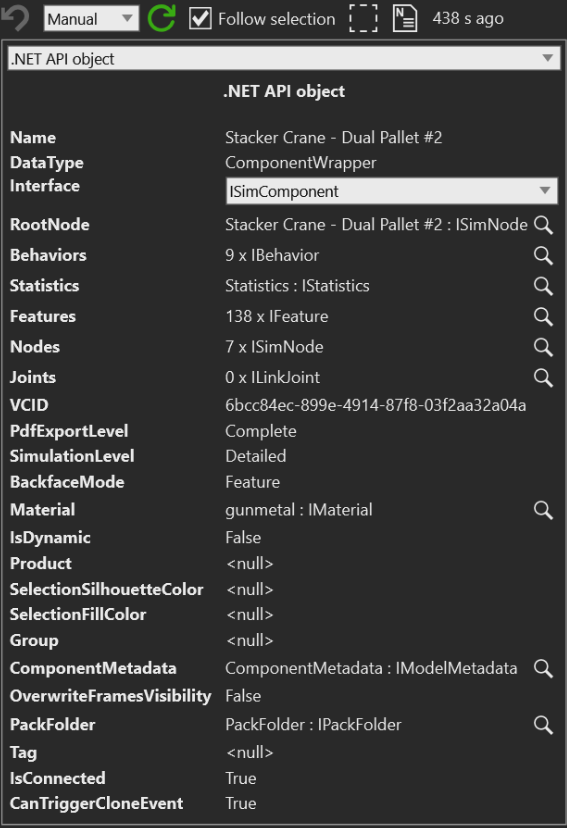
- Name and DataType identify the inspected API object
- Interface selects All or one of the implemented interfaces with inspectable fields
- Rows such as RootNode, Behaviors, Statistics, Features, and Nodes show values exposed by the selected interface
- A magnifier beside a value means that the related object or collection can be inspected separately
Before you start
- Select an object that exposes an inspectable .NET API object
Steps
- Open Inspector for the selected object.
- In the gadget selector, select .NET API object gadget.
- Check Name and DataType to confirm that the gadget is showing the intended object.
- In Interface, select All to scan the available API fields, or select a specific implemented interface to focus the rows.
- Read the displayed values for the investigation question. Use the magnifier beside a nested object or collection when its contents need separate inspection.
Interpret the result
- All combines fields from the implemented interfaces that expose inspectable values. A specific interface limits the rows to that interface.
- A value such as
9 x IBehavior,138 x IFeature, or7 x ISimNodeis a collection summary. Use its magnifier to inspect the collection contents. <null>means that the selected API property returned no value in the current layout state. For example, the captured crane has<null>for Product, Group, Tag, and selection colors.- A row with an object value, such as RootNode or Statistics, includes the displayed object identity and an inspect action. Follow it when the summary is not enough to answer the question.
- The gadget reads public properties from the selected interface. If a property getter cannot be read, the implementation skips that property, so a missing row is not evidence that the source object has no such member.
Read-only boundary
The gadget displays text rows and changes which interface is shown; it does not provide a property editor or a setter for the displayed API values. The magnifier opens a related value for inspection, while the value context menu can copy display text or select a related layout object. These actions do not change the source property value.
Use the separate Property container gadget when the investigation requires the layout's property-container view. That is a different surface from this generic API inspection view.
Related tasks
See Inspector gadget system for choosing a gadget. Use Object hierarchy to follow the selected object's tree context, or Object bounds to investigate its visual dimensions and world center.