
.NET collection gadget
Inspect the members and types of a supported .NET collection exposed by an Inspector API object.
Inspect collection members
Use .NET collection gadget to read the members of a collection exposed by another Inspector view. The gadget is a read-only inspection surface: it displays the current collection and does not alter the source collection contents.
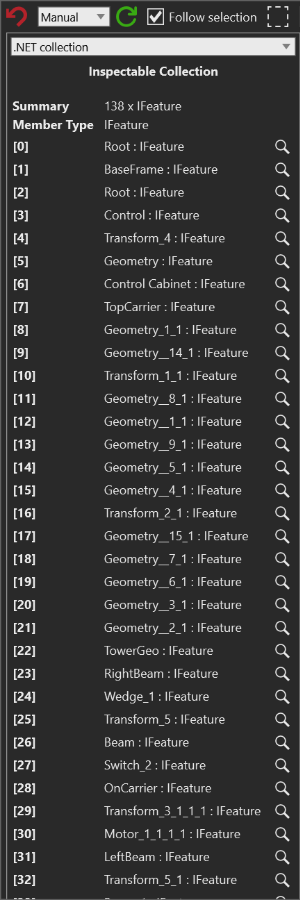
- Summary identifies the number of members and the displayed member type
- Member Type shows the collection's primary value type
- Indexed rows show each displayed member and a magnifier when the value can be inspected further
Before you start
- Select an object that exposes a collection-valued API field, such as Features or Nodes
- Open .NET API object gadget and choose an interface that exposes the collection
Steps
- In .NET API object gadget, find a collection-valued row such as Features or Nodes.
- Select the row's magnifier to open that value in a new .NET collection gadget.
- Confirm Summary and Member Type before interpreting the rows.
- Read the indexed member rows. Use the magnifier beside a row when the member is an inspectable object or another collection.
- Scroll the gadget when the collection has more members than the visible panel.
Interpret the result
- An ordinary enumerable uses zero-based labels such as [0], [1], and [2].
- A dictionary uses its keys as labels, such as [SomeKey], and reports the dictionary value type as Member Type.
- A value such as
Root : IFeaturecombines the displayed object identity with its type. Open its magnifier when the identity alone does not answer the investigation question. - Summary uses the collection count and member type, for example
138 x IFeature. Use it to check that the value opened from the API row is the collection you intended to inspect. <null>means that a displayed value returned no value. It is not a command to create or replace a member.- A collection must be an
IEnumerable; strings are excluded from this gadget. If the selected value is not a supported collection, choose another API row or return to .NET API object gadget.
Read-only boundary
The gadget creates display rows from the current collection values. It provides no collection editor, add/remove command, or setter for those values. Opening a member for deeper inspection, copying displayed text, or selecting a related layout object are observation and navigation actions; they do not change the source collection.
Related tasks
Use .NET API object gadget to find collection-valued API rows. Use Object hierarchy to place an inspected member in its simulation tree, or Object bounds to investigate its visual dimensions and world center.