
Dynamic component gadget
Inspect the parent component, layout, owning container, metadata name, and VCID of a simulation-created component in Object Inspector.
Inspect a dynamic component
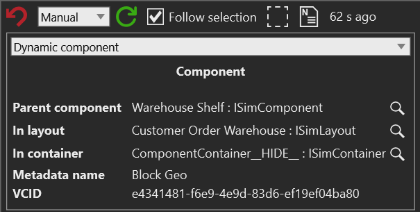
Use Dynamic component gadget to identify where a simulation-created component is attached, which layout contains it, and whether a container currently owns it. The gadget also exposes the component metadata name and VCID when those values are available.
Before you start
- Run the model far enough to create a runtime component
- Select the runtime component in the 3D view or another Visual Components view
Steps
- Open Inspector for the selected runtime component.
- In the gadget selector, select Dynamic component gadget.
- Read Parent component, In layout, and In container to establish the component's current ownership context.
- Read Metadata name and VCID when you need to identify the component type or compare it with another runtime instance.
- Use the inspect action beside an object-valued row to follow that component, layout, or container in Inspector.
Interpret the result
- Parent component is the component associated with the selected
component's parent root node. It can be
<null>when no parent component is returned. - In layout is the layout returned by the selected component's root node. Use it to distinguish the containing layout from the component hierarchy.
- In container is the
ISimContainerbehavior whoseComponentscollection contains the selected dynamic component. It can be<null>when no owning container is found. - Metadata name comes from the component metadata name. A blank value means the current component supplied no displayable metadata name.
- VCID is the component's unique component type identifier. A blank value means the current component supplied no VCID.
- A static layout component is not eligible for this gadget. If the card shows no component data, confirm that the selected object was created during simulation and is still the inspected object.
Use the result
- A populated Parent component with a blank In container points to a hierarchy relationship without a matching container membership; inspect the parent and its behaviors before investigating the runtime component further.
- A populated In container identifies the behavior that currently owns the component. Follow it when the investigation concerns membership, loading, or runtime movement.
- Use Object hierarchy when you need the broader parent and child tree, or PM product when the component's Process Modeling product relationship is the investigation question.
Related tasks
See Inspector gadget system to choose another view for the selected object. Use Object hierarchy for tree context or Process Modeling product for product state.